Únete a la red Join the network
Tres puertas, una sola red Three doors, one network
Hay tres formas de conectarte a El Faro, de la más sencilla a la más comprometida. Empieza por la que va contigo hoy; siempre puedes dar el siguiente paso.
There are three ways to connect to El Faro, from the simplest to the most involved. Start with the one that fits you today — you can always take the next step.
A · Solo tu teléfono A · Just your phone
FácilEasy
Una app y tu conexión a internet. Listo en unos 10 minutos, sin gastar nada.
One app and your internet connection. Ready in about 10 minutes, at no cost.
B · Una radio Meshtastic B · A Meshtastic radio
IntermedioIntermediate
Una radio LoRa de ~$30 USD que habla directo con la malla, sin internet.
A ~$30 USD LoRa radio that talks straight to the mesh — no internet needed.
C · Un nodo en tu azotea C · A node on your roof
AvanzadoAdvanced
Alojas un nodo que extiende la cobertura para todo tu vecindario.
Host a node that extends coverage for your whole neighborhood.
📱 A · Solo con tu teléfono 📱 A · With just your phone
Fácil · sin hardware · sin costoEasy · no hardware · free
La forma más rápida de entrar. Si tienes un teléfono con internet, puedes estar en la red en unos 10 minutos. No necesitas comprar nada. Esta ruta usa Reticulum sobre internet (TCP), conectándose a nuestro hub público.
The fastest way in. If you have a phone with internet, you can be on the network in about 10 minutes. Nothing to buy. This route uses Reticulum over the internet (TCP), connecting to our public hub.
Cómo hacerlo How to do it
- Instala Sideband, el mensajero de Reticulum. En Android está en F-Droid, Google Play o como APK desde GitHub; también hay versión para escritorio (Linux, Windows, macOS).
- Abre Sideband y ve a Ajustes → Conectividad / Interfaces. Agrega una interfaz TCP («Connect via TCP») apuntando a nuestro hub:
207.180.227.74:4965. - Guarda. En unos segundos verás que anuncia conexión. Ya estás en la red: puedes escribir a otras personas y entrar al BBS «Chapala Lakeside».
- Install Sideband, the Reticulum messenger. On Android it's on F-Droid, Google Play, or as an APK from GitHub; there's also a desktop build (Linux, Windows, macOS).
- Open Sideband and go to Settings → Connectivity / Interfaces. Add a TCP interface ("Connect via TCP") pointing at our hub:
207.180.227.74:4965. - Save. Within seconds it will announce a connection. You're on the network — you can message other people and reach the "Chapala Lakeside" BBS.
Sideband GitHub / APK Ver el BBSVisit the BBS
Nota: esta puerta depende de internet. Si internet se cae, las rutas por radio (Puerta B) siguen funcionando — por eso la red es en capas.
Note: this door depends on the internet. If the internet goes down, the radio routes (Door B) keep working — that's why the network is layered.
📻 B · Una radio Meshtastic (~$30 USD) 📻 B · A Meshtastic radio (~$30 USD)
Intermedio · un poco de configuraciónIntermediate · a little setup
Por unos $30 a $50 USD consigues una radio LoRa pequeña que habla directo con la malla: sin internet, sin plan de datos, con batería. Es la columna vertebral que sigue funcionando cuando el internet no está. Funciona en Chapala y San Antonio Tlayacapan, donde hoy tenemos cobertura.
For about $30 to $50 USD you get a small LoRa radio that talks straight to the mesh: no internet, no data plan, battery-powered. It's the backbone that keeps working when the internet doesn't. It works in Chapala and San Antonio Tlayacapan, where we have coverage today.
Modelos recomendados Recommended models
- Heltec V3 — económica, muy común, con pantallita. Buena primera radio.
- LILYGO T-Beam — trae GPS integrado y portapilas 18650; ideal si quieres compartir tu posición.
- SenseCAP T1000-E — del tamaño de una tarjeta, sellada y con GPS; perfecta para llevar encima.
- Heltec V3 — cheap, very common, with a little screen. A great first radio.
- LILYGO T-Beam — built-in GPS and an 18650 battery holder; ideal if you want to share your position.
- SenseCAP T1000-E — card-sized, sealed, with GPS; perfect for carrying with you.
Cómo hacerlo How to do it
- Consigue una de las radios de arriba.
- Instala la app Meshtastic (Android o iOS) o usa el cliente web en meshtastic.org. Empareja la radio por Bluetooth y actualiza el firmware.
- Únete al canal «Chapala» escaneando el código QR del canal (abajo). Al escanearlo, tu radio queda en el canal comunitario compartido.
- Get one of the radios above.
- Install the Meshtastic app (Android or iOS) or use the web client at meshtastic.org. Pair the radio over Bluetooth and update the firmware.
- Join the "Chapala" channel by scanning the channel QR code (below). Scanning it puts your radio on the shared community channel.
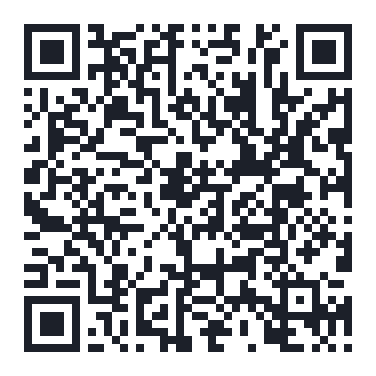
Ya en el canal: puedes usar el BBS sobre la malla con estos comandos: bbslist (ver boletines), bbsread #N (leer el número N — la # es obligatoria) y bbspost (publicar).
Once you're on the channel: you can use the on-mesh BBS with these commands: bbslist (list bulletins), bbsread #N (read number N — the # is required) and bbspost (post).
🗼 C · Aloja un nodo en tu azotea 🗼 C · Host a node on your roof
Avanzado · compromiso continuoAdvanced · ongoing commitment
La red crece cuando los vecinos alojan nodos. Un nodo en tu azotea extiende la cobertura para todas las personas a tu alrededor. Es un compromiso real: requiere algo de maña y cuidado continuo, pero es lo que hace que El Faro llegue más lejos. Hoy somos 6 nodos; cada azotea nueva suma.
The network grows when neighbors host nodes. A node on your roof extends coverage for everyone around you. It's a real commitment: it takes some know-how and ongoing care, but it's what makes El Faro reach farther. Today we're 6 nodes; every new rooftop counts.
Qué se necesita What's involved
- Un buen punto alto — una azotea o ventana despejada; la vista hacia el lago ayuda mucho.
- Energía estable — un adaptador USB basta; opcional panel solar si lo quieres fuera de la red eléctrica.
- Conexión — internet si va a ser un nodo puente, o solo LoRa si va a ser un nodo de cobertura.
- Una caja intemperie — un gabinete pequeño y resistente al clima para proteger la radio y la antena.
- A good high spot — a clear rooftop or window; line of sight over the lake helps a lot.
- Steady power — a USB adapter is enough; a solar panel is optional if you want it off the grid.
- Connectivity — internet if it will be a bridge node, or LoRa-only if it will be a coverage node.
- A weatherproof box — a small, weather-resistant enclosure to protect the radio and antenna.
Nosotros te ayudamos a planearlo, elegir el hardware y ponerlo en marcha. Escríbenos y lo vemos juntos.
We'll help you plan it, choose the hardware, and get it running. Write to us and we'll work it out together.
[email protected] Cómo funciona la redHow the network works Ver los nodosSee the nodes
Qué NO es What this is not
El Faro es un complemento, no un reemplazo. No sustituye al 911, a Protección Civil ni a tu teléfono celular. Es una red comunitaria que suma resiliencia cuando otros servicios fallan.
El Faro is a supplement, not a replacement. It does not replace 911, civil protection, or your cell phone. It's a community network that adds resilience when other services fail.
- En una emergencia real, llama al 911. Usa la red como respaldo cuando no haya señal o luz.
- Cobertura hoy: Chapala y San Antonio Tlayacapan. Estamos creciendo, nodo por nodo.
- Es un proyecto comunitario, abierto y sin fines de lucro. No vendemos nada ni recopilamos tus datos.
- In a real emergency, call 911. Use the network as a backup when there's no signal or power.
- Coverage today: Chapala and San Antonio Tlayacapan. We're growing, node by node.
- It's a community project — open and non-profit. We sell nothing and collect none of your data.